GST billing software for Indian shops.Fast at the counter. Ready for GST.
Elathi SmartPOS is billing, stock and khata software for kirana stores, grocery shops and supermarkets. Scan and bill in seconds, even without internet, send bills on WhatsApp, and hand your accountant a ready GSTR-1 file.
For Windows PCs. One-time price, no monthly fee. No payment details for the trial.
- Bills without internet
- GSTR-1 and GSTR-3B ready
- PDF bills on WhatsApp
- Tamil, Hindi and 3 more languages
INV INV/26-27/0014212 Oct, 7:42 pm
A simplified demo of the Billing screen. See the real screens ↓ · ·
The real app
Point-of-sale software that looks this simple. Because it is.
These are real SmartPOS screens from a sample store. Pick a screen, then point at a number to see what it does.
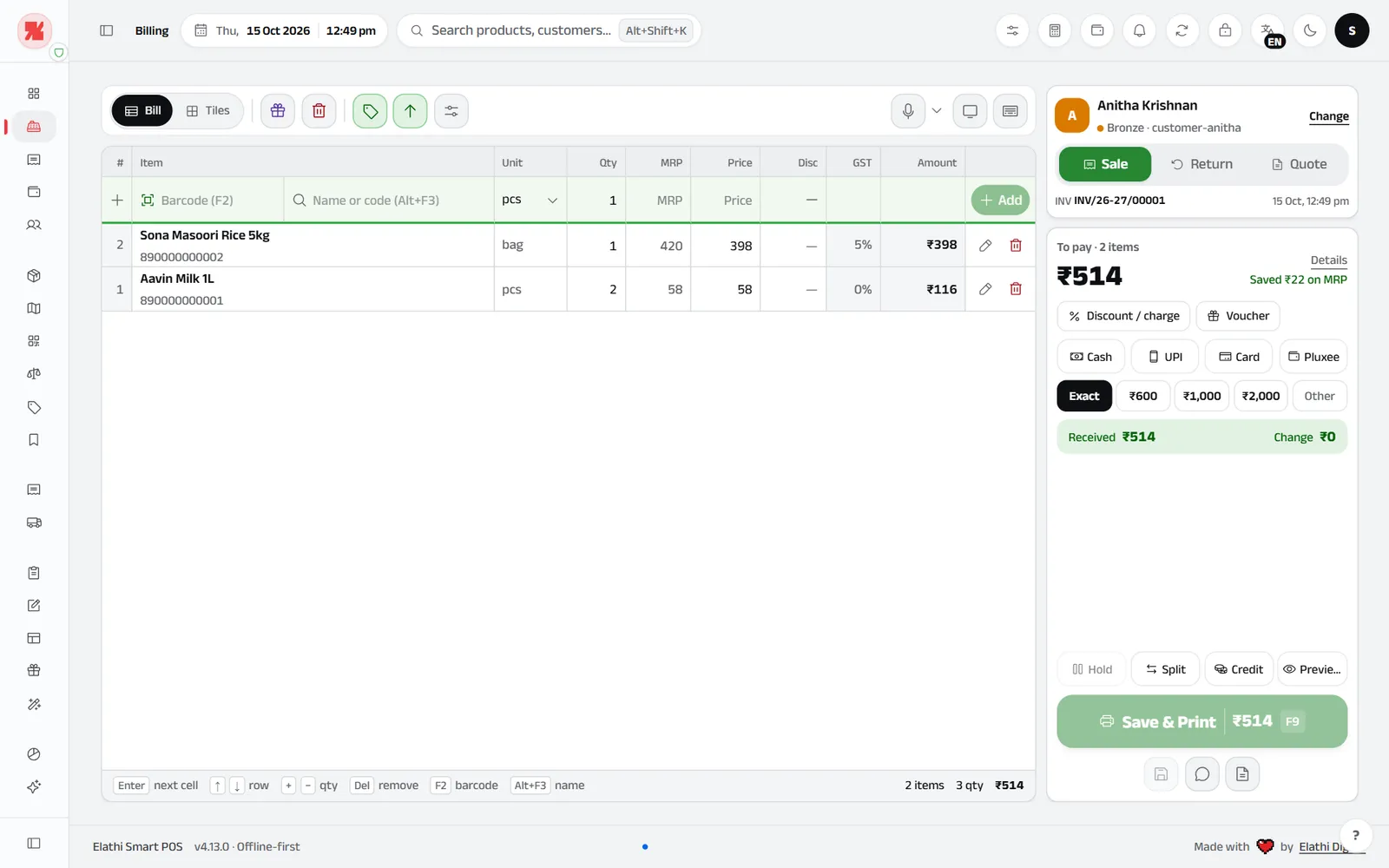
The whole screen
Products on the left, the customer and payment on the right: one screen from the first scan to the printed bill.
Scan or type a name
Barcode (F2) and Name or code (Alt+F3) boxes stay at the top of the bill. Search understands shop words like “cheeni” or “doodh”.
Every line, clearly
The bill works like a spreadsheet: type straight into Qty, MRP, Price and Disc (5% or ₹5), and every line shows its GST rate. Enter moves on, + and − change the qty.
Customer and bill type
Pick or add a customer by mobile number, and choose Sale, Return or Quote.
The amount to collect
The biggest number on the screen. GST, savings and round-off sit under Details.
Pay and print
Cash with Exact and note buttons, UPI, Card or your own payment names, and vouchers. Save & Print with F9, or Hold, Split and Credit.
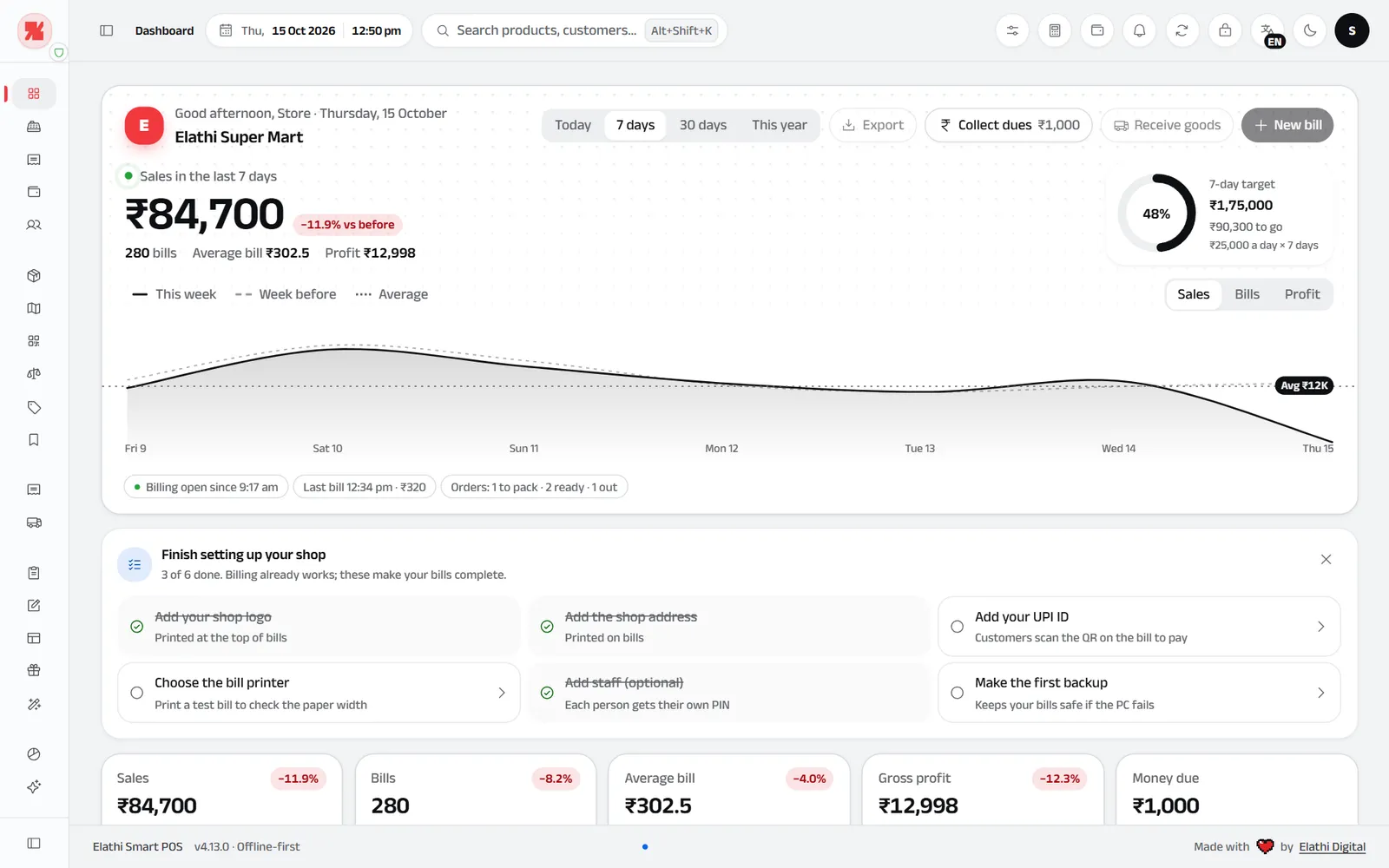
The whole screen
Sales, the day’s curve and what needs your attention, the moment you open SmartPOS.
Sales at a glance
Sales, bills, average bill and profit for today, 7 days, 30 days or the year, compared with before.
Daily target
Set a sales target if you like, and watch the ring fill through the day.
Hour by hour
Sales across the day or the week, against the one before. Switch between sales, bills and profit.
Finish setting up
A short checklist: logo, UPI ID, bill printer, staff and your first backup.
The numbers that matter
Sales, bills, average bill, gross profit and money due, each with its change.
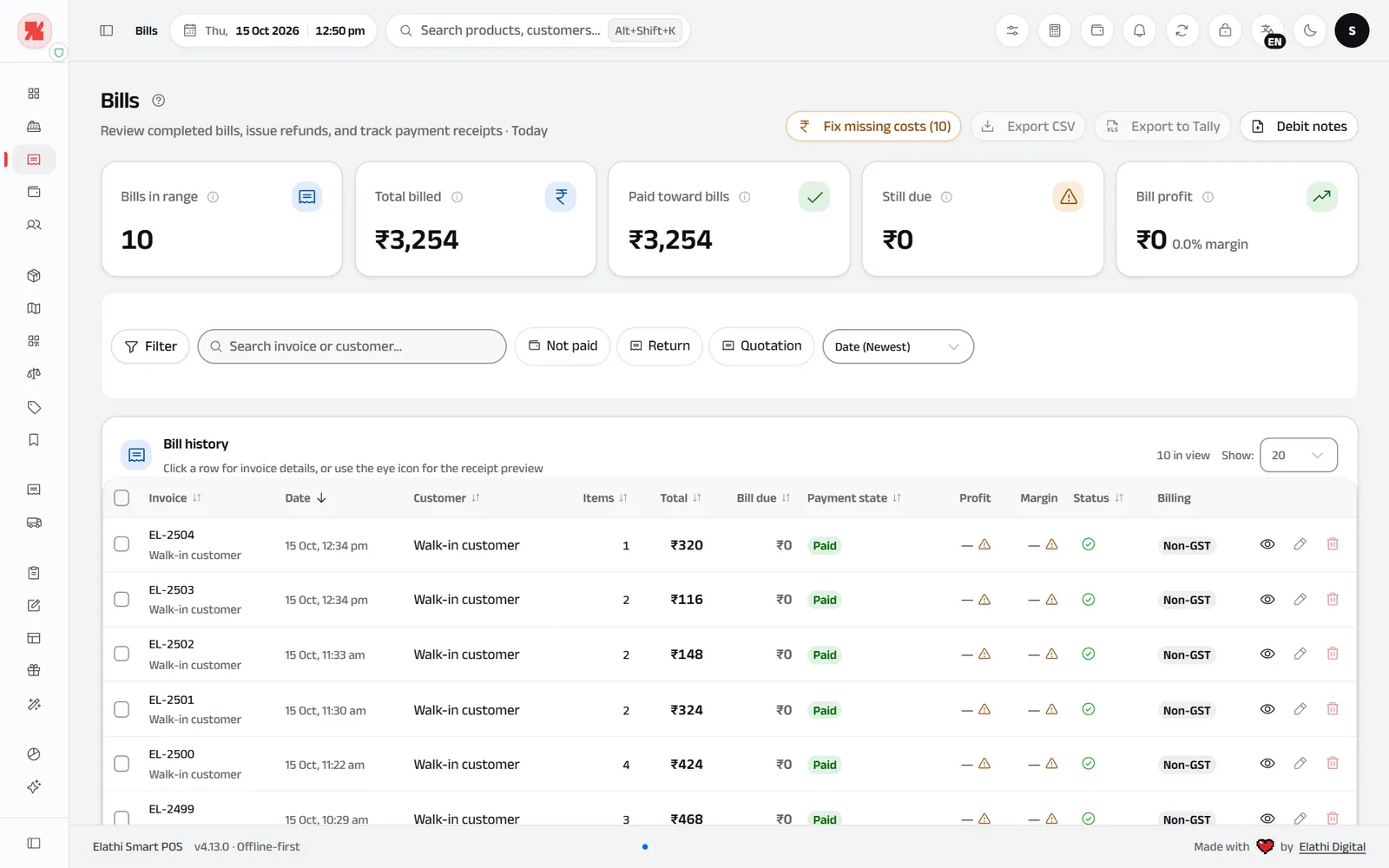
The whole screen
Every bill on one page, with totals for the period, filters and exports.
Any period
Today, 7 days, 30 days, this year or any dates you pick.
Billed, paid, still due
Totals for the period, with what is still owed and the profit on those bills.
Ready for your accountant
Export to CSV or straight to Tally.
Every bill, kept
Open, reprint or send any bill. Edits keep a history of who changed what, and when.
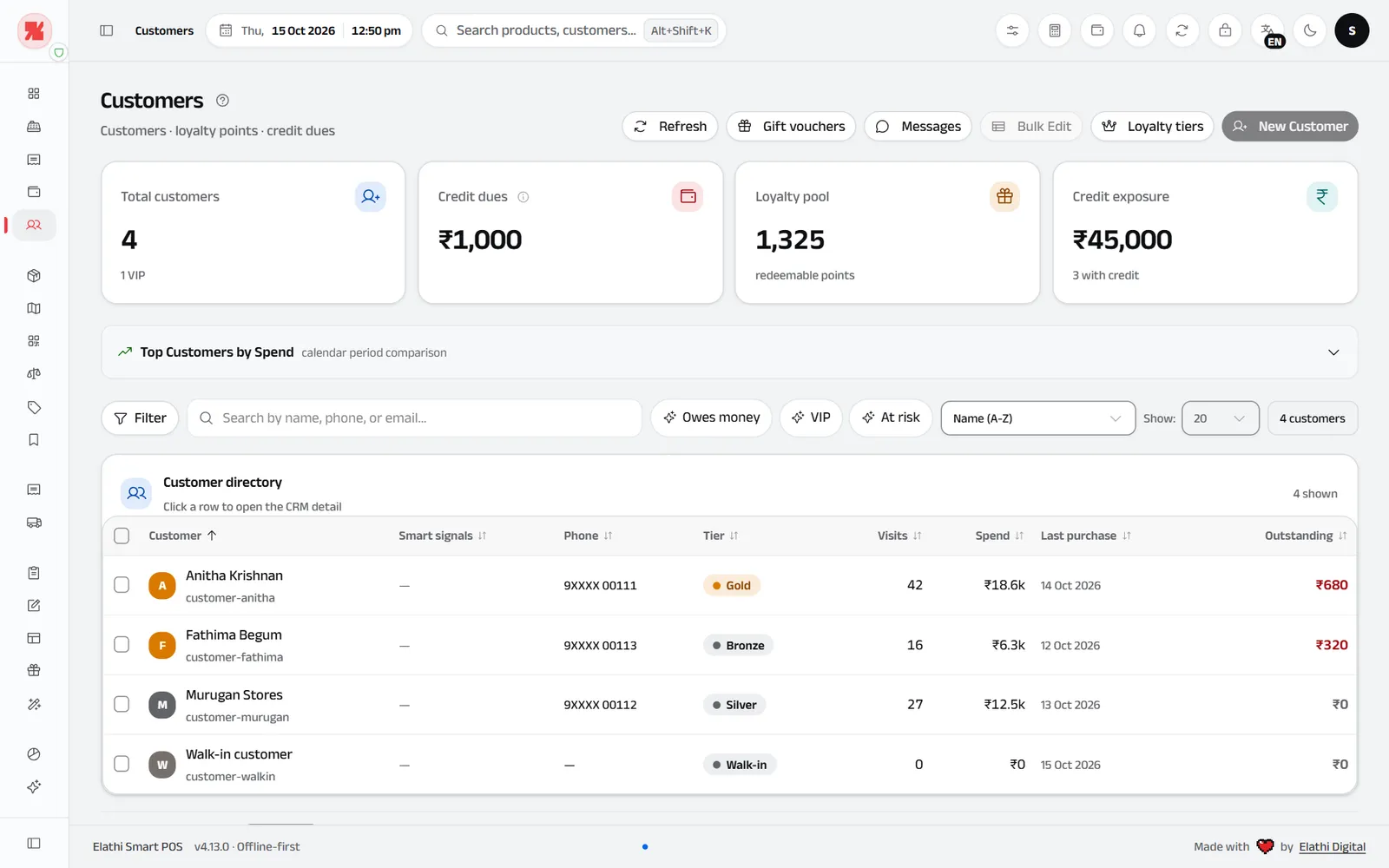
The whole screen
All your customers with what they owe, their visits and their loyalty points.
Credit due (khata)
Put a bill on credit with one switch. The total owed to you is always on top.
Loyalty points
Customers earn points and spend them at billing on rewards you choose.
Tiers that reward regulars
Gold, Silver and Bronze customers, with offers just for them.
Who owes what
Each customer’s balance, visits and last purchase.
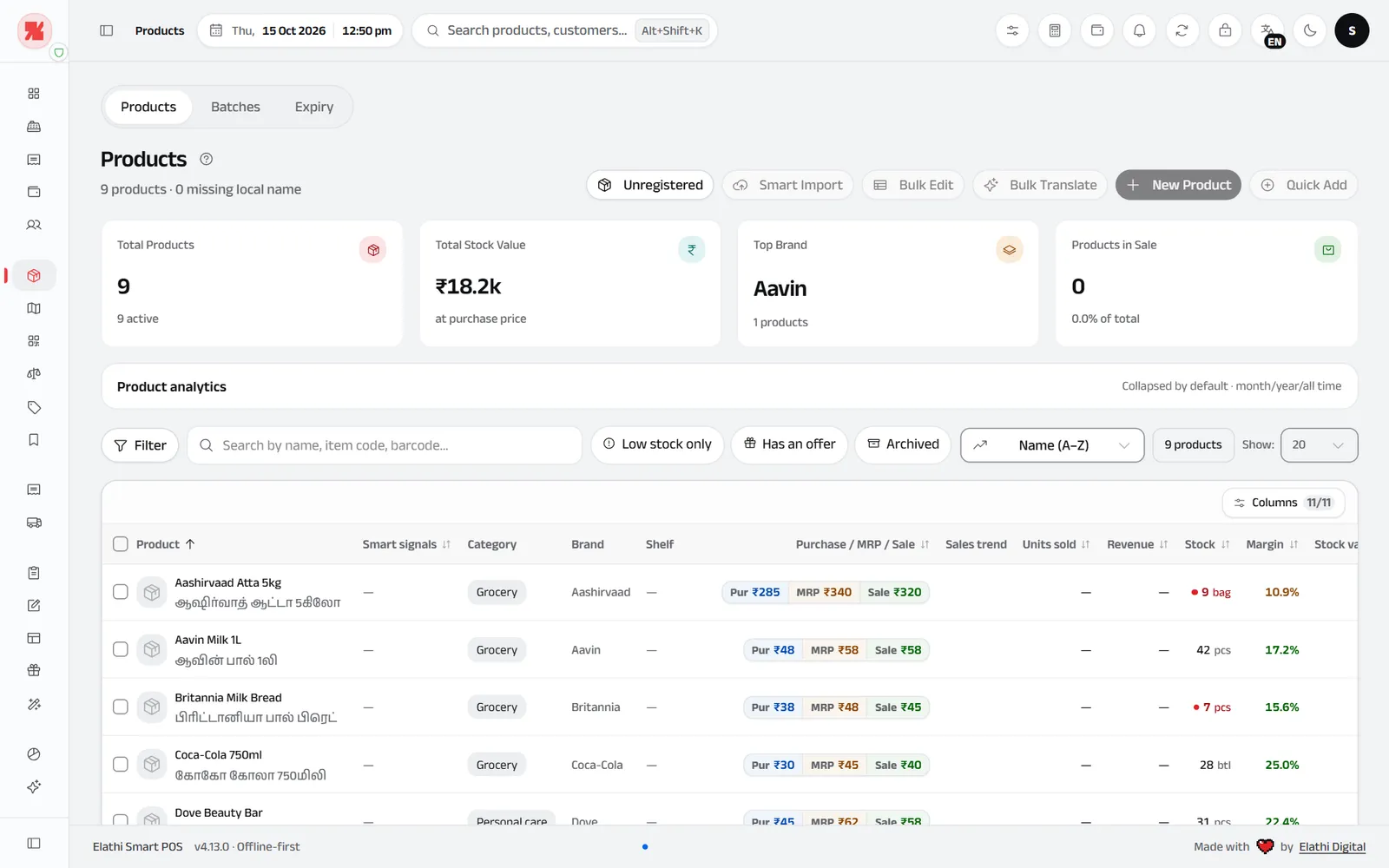
The whole screen
Your whole catalogue with prices, stock and margin, plus tools for big lists.
Products, batches, expiry
One screen with three tabs. Expired batches are blocked at billing.
Big lists, made easy
Smart Import from Excel, Bulk Edit and Quick Add for hundreds of items at once.
Find anything
Filter by category, brand, supplier, shelf, offers or low stock.
Names in your language
A local name next to the English one, printed on bills if you want.
Prices and margin
Purchase price, MRP and sale price side by side, with the margin worked out.
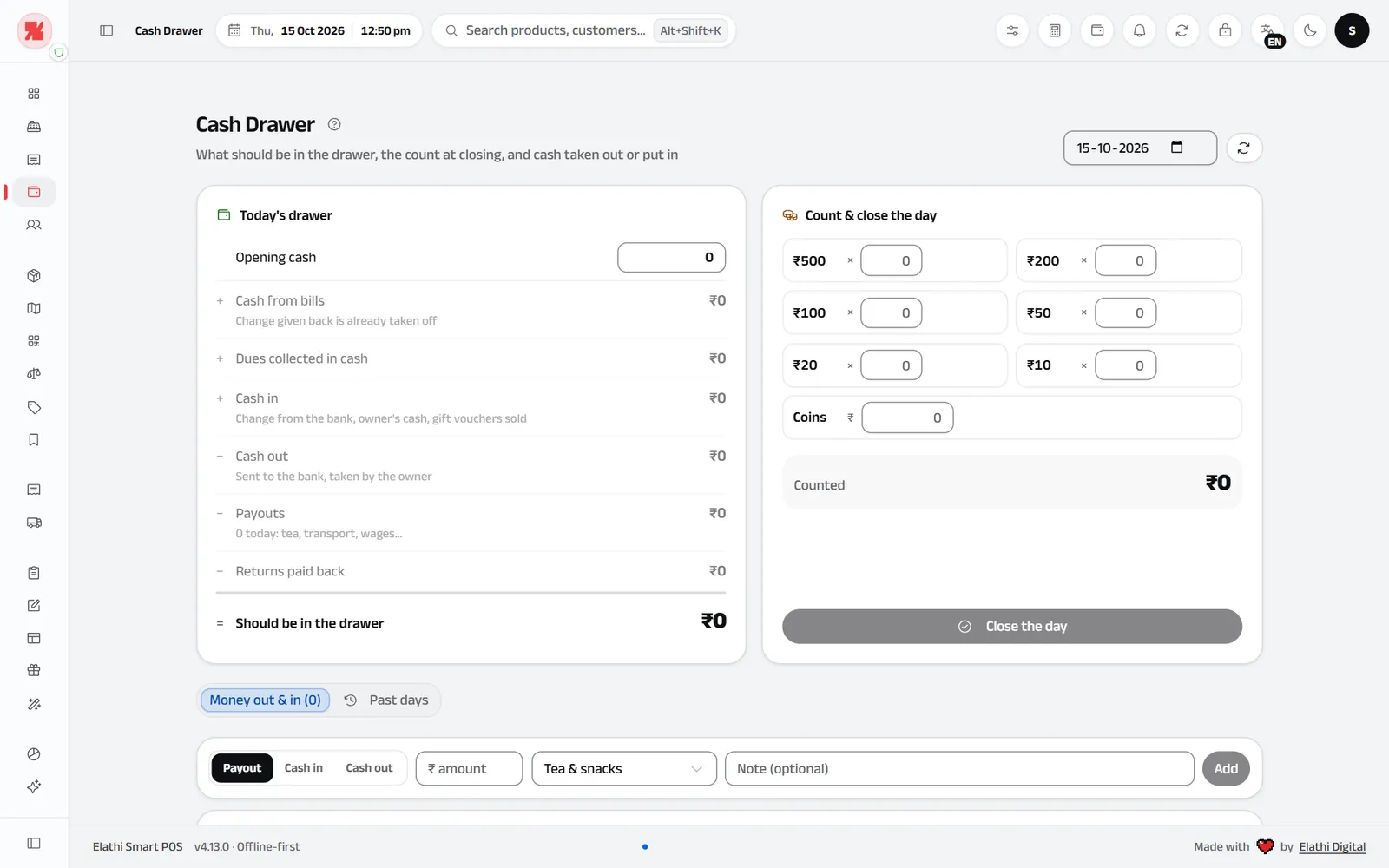
The whole screen
Today’s drawer on the left, the note count on the right, cash in and out below.
What should be in the drawer
Opening cash, cash from bills after change, dues collected and cash in, less payouts and returns.
Count notes, not totals
Type how many ₹500, ₹200, ₹100… notes and coins you have. SmartPOS adds them up.
Short or extra?
Counted against what should be there, so you see at once if cash is short or extra.
Close the day
Save the count. Past days stay in the history.
Cash in and out
Change from the bank, cash sent to the bank, tea and transport: each with a reason.
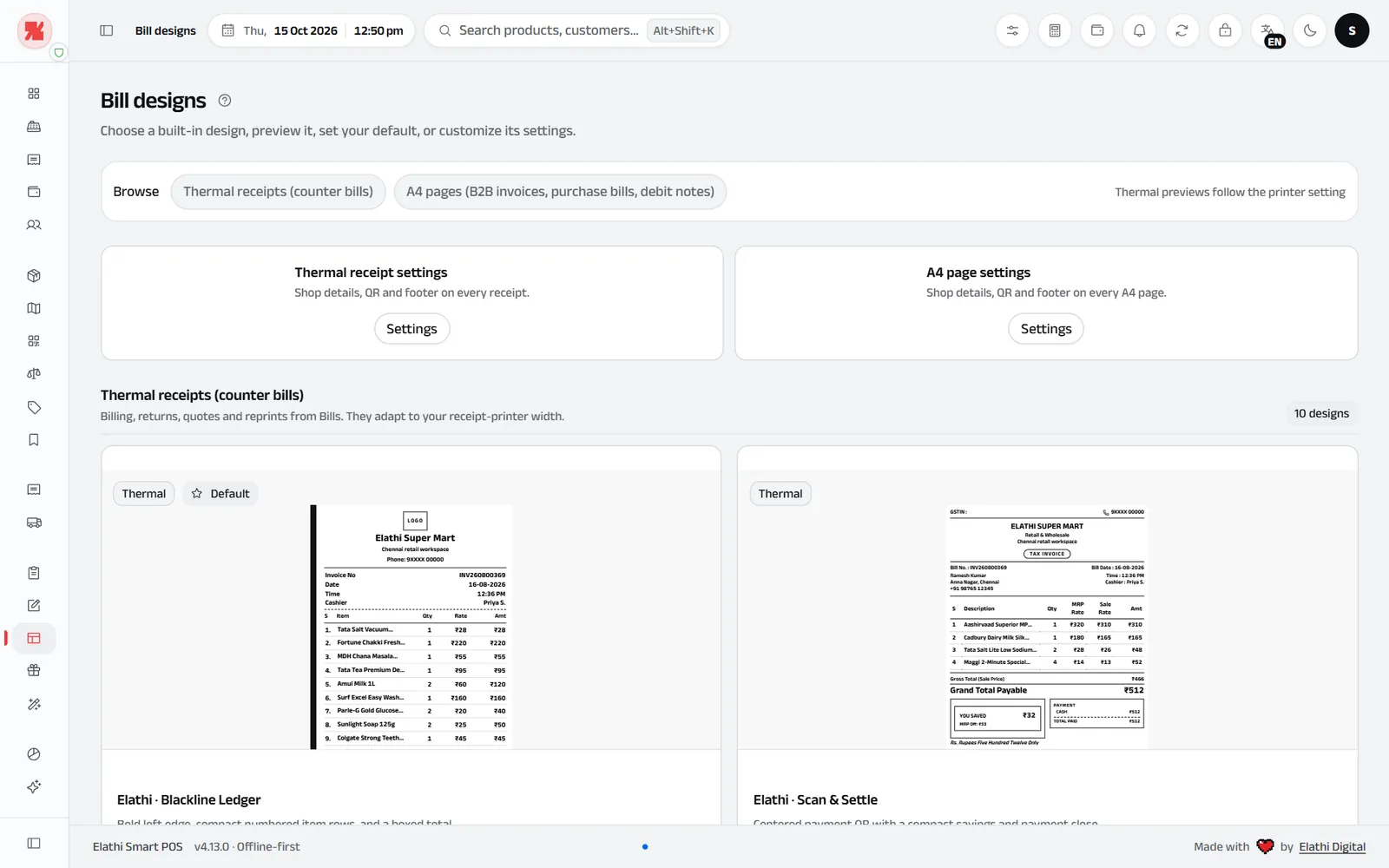
The whole screen
Thermal receipts and A4 invoices, ready to preview and set as default.
Thermal and A4
58 mm and 80 mm receipt printers, or full A4 pages from any Windows printer.
10 receipt designs
Preview each one with your shop’s details and set your favourite as default.
Proper GST documents
GST tax invoice, bill of supply, estimate and delivery challan. Returns print as credit notes.
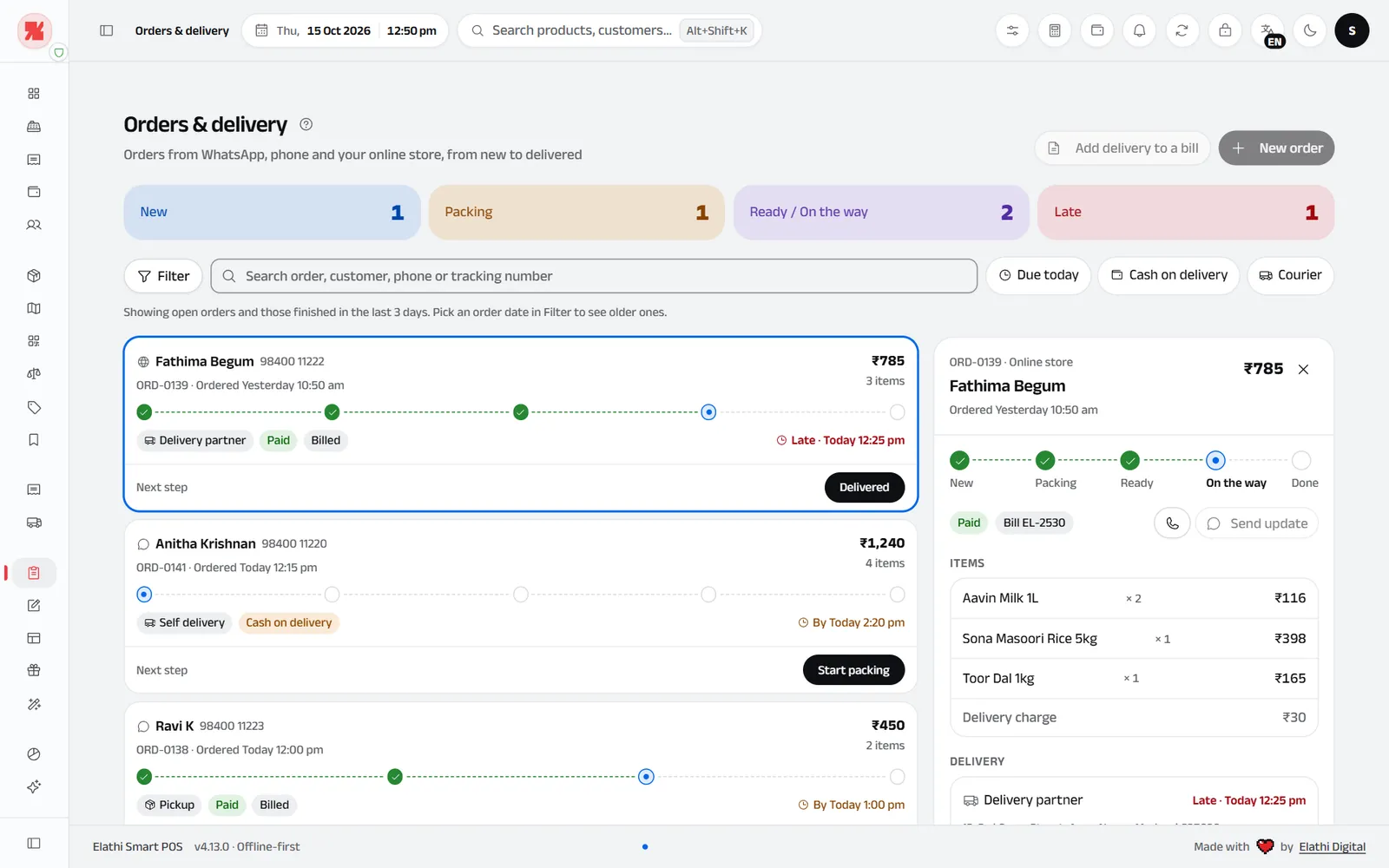
The whole screen
Every order from WhatsApp, phone or your online store, from new to delivered.
Counts at a glance
New, packing, ready and late orders, counted at the top.
Every step on the card
Each order shows its steps: New, Packing, Ready, On the way, Done.
One tap to the next step
The button always says what comes next, like Start packing or Delivered.
Tell the customer
Send a WhatsApp update or call, right from the order.
Late orders stand out
Orders past their time turn red and show in the bell.
Screens show “Elathi Super Mart”, a sample store. Names and numbers are made up.
Voice billing · new
Say it. It’s on the bill.
Say “two milk and one sugar” and SmartPOS adds both items with the right quantities, while your hands stay free for packing.
Choose how it listens, the microphone and the language in Settings → Devices, with a level meter and a Test button.
Heardtwo milk and one sugar
Click a language to hear it in that language.Tap a language to hear it in that language.
★★★★★
Straight from the counter. In their words.
Panchanathan Stores in Kallakurichi uses SmartPOS at the counter, and runs their online shop on a website we built.


“We recently started using Elathi SmartPOS, and we’re very happy with the experience so far.”
Features
Everything your shop needs, in one billing app.
More than 30 screens cover the daily work of an Indian store. Simple mode shows only what a small shop uses every day; Full mode shows everything.
Offers that apply themselves
Buy X get Y, combos, happy hours, birthdays and coupons. Billing picks the best one.
GST returns on time
My GST plan shows only the forms your shop needs, with due dates.
More billing counters
Every counter bills into one Main PC.
Your data, safe
Each person signs in with a PIN and sees only their work.
Reports, Excel and Tally
Ask a plain question (sales, profit, stock, dues) and get the answer with Print, Excel or WhatsApp.
WhatsApp messages
Offers, greetings and due reminders to a group of customers.
Purchases and suppliers
Type the supplier’s bill and see what you owe.
Loyalty points
Points on every bill, tiers and rewards.
Barcode labels
Price labels for anything without a barcode.
Excel import
Bring in products and opening stock at once.
Who it’s for
Made for the way your shop sells. Pick yours.
Billing software for kirana stores
Regulars, loose items and credit, handled at the speed of a busy counter.
- Credit (khata) with one switch, and every customer’s balance
- Loose items by weight, with the Weigh button
- Search in shop words: “cheeni”, “doodh”, “arisi”
Billing software for supermarkets
Several counters, thousands of barcodes and offers that run themselves.
- Counters on the shop network share one Main PC
- Batches and expiry, oldest stock sold first
- Offers, combos and happy hours applied at billing
Billing software for grocery and general stores
Loose rice and dal, packets with expiry dates and prices that change every week, all handled at the counter.
- Loose items by weight with the Weigh button, and packs made from bulk
- Batches and expiry dates; expired stock is blocked at billing
- Prices that change on a date you set
Billing software for fancy, gift and stationery shops
Hundreds of small items, gift packing and the right GST rate on each.
- Barcode and price labels for small items
- Gift packing as a line on the bill
- GST rates from the official list, including 3% for imitation jewellery
Your counter
Works with your scanner, printer and cash drawer. Even offline.
Point at a device to see what SmartPOS does with it. Then switch the internet off.
Main PC
SmartPOS runs here and keeps your data. Any 64-bit Windows PC, laptop or touch screen.
Barcode scanner
USB or wireless scanners that type like a keyboard. Scan a membership card to pick the customer.
Receipt printer
58 mm and 80 mm thermal printers with Fast Print, or any Windows printer for A4 bills.
Cash drawer
Opens after cash sales through the receipt printer it is plugged into.
Weighing scale
Sell loose items in kg or g with the Weigh button in Billing.
Customer display
The bill with a UPI QR, or your offers, on a TV, tablet or phone over the shop Wi-Fi.
Counter 2
More counters bill at the same time and share the Main PC over an encrypted connection.
Switch it off: the shop keeps billing. Only a few things wait for the connection to come back.
Keeps working
- Billing, printing and UPI QRstill working
- Stock, purchases and creditstill working
- Reports, GST files and backupsstill working
- Counters and TV on shop Wi-Fistill working
Waits for internet
- Sending on WhatsAppwaits
- Downloading updateswaits
- Activating your licencewaits
- Canva designswaits
Pricing
One-time price. No monthly fee.
Try every feature free for 7 days first. No payment details needed for the trial.
Standard
A licence you keep, for one Main PC.
₹9,999one-time
- Every feature in the app
- Updates and support for the first year
- Keeps working after year one
- Renew Care later for more updates
Lifetime
Pay once, get every future update.
₹24,999one-time
- Every feature in the app
- Lifetime updates
- Lifetime standard support
- One Main PC included
- Pay securelyOn our Cashfree page by UPI, card or net banking. Choose one plan.
- Get your keyWe send your licence key by email and WhatsApp.
- ActivateInstall SmartPOS on your Windows PC and enter the key.
Extra billing counters on the same shop network need their own licence. Ask for counter pricing
Updated regularly. Latest version 4.16, released 15 Oct 2026. What’s new
Installing SmartPOS
Three quick steps. Two calm warnings.
SmartPOS is new and its installer isn’t signed with a paid certificate yet, so Windows and your browser ask you to confirm the first install. Nothing is wrong, and every update inside the app is checked automatically.
- Every feature free for 7 days
- No card, no sign-up
- Works offline
Downloading SmartPOS…Check your browser’s downloads.
Want free help setting it up?
Leave your WhatsApp number and we’ll message you to help install it and make your first bill.
Usually within an hour, Mon–Sat 10–6. Meanwhile, the three steps below get you through the first install.
The browser asks to keep it
Chrome or Edge may say the file “isn’t commonly downloaded”. Open the menu (···) on the download and choose Keep, then Keep anyway.
Windows asks once more
On the blue “Windows protected your PC” screen, click More info, then Run anyway.
Install and start
Click Install. SmartPOS opens on its own and your 7-day free trial starts. No key needed.
These steps are only for the first install. If your antivirus asks, choose Allow. Keep the internet on during the first install, since Windows may fetch a small part it needs. Stuck? Message us on WhatsApp and we’ll help you install it.
Does SmartPOS work without internet?
Yes. Billing, printing, stock, credit, reports and GST files all work offline on your Main PC, and counters on the shop network keep working too. Internet is needed only to activate your licence, download updates, send on WhatsApp and use Canva.
What computer do I need?
A 64-bit Windows PC: a laptop, desktop or touch-screen PC. Send us your PC model and we will confirm it is a good fit.
Can I try SmartPOS before I buy?
Yes. Every feature is free for 7 days, and you do not need to enter payment details to start. Message us on WhatsApp and we will help you install it.
Is there a monthly fee?
No. Standard (₹9,999) and Lifetime (₹24,999) are one-time payments for one Main PC. Standard includes the first year of updates and support and keeps working after that; Lifetime includes every future update.
How do I buy and get my licence key?
Pay on our secure Cashfree page and choose one plan. We send your licence key to your email and WhatsApp. Install SmartPOS on your Windows PC and enter the key to activate.
Can I bill on more than one counter?
Yes. Extra counters on your shop network connect to the Main PC over an encrypted connection and bill at the same time. Each extra counter needs its own licence; tell us how many you have.
Which barcode scanners and printers work?
Scanners that type like a keyboard (most USB and wireless scanners), 58 mm and 80 mm thermal receipt printers, any A4 printer set up in Windows, and cash drawers connected to the receipt printer.
Does SmartPOS make GST returns?
Yes. Answer a few questions in My GST plan and SmartPOS shows only the forms your shop needs, with due dates: GSTR-1 with the portal file, GSTR-3B, CMP-08, GSTR-4, GSTR-9 and more. Each one lists the numbers to type on the portal, step by step, or you can send it to your CA. Please have your accountant check them before you file.
Can I keep credit (khata) for customers?
Yes. Put a bill on credit with one switch, record payments against the due, and see every customer’s balance.
Can I bring in my existing products?
Yes. Import products and opening stock from an Excel or CSV file, map the columns and preview before saving. Bulk Edit and Quick Add help with long lists.
Is my shop data safe?
Your data stays on your own Main PC. Each person signs in with a PIN, roles limit what staff can do, and refunds or deletes need the Owner PIN. Verified backups can run on a schedule; keep a copy on another drive.
Can I take orders on WhatsApp or phone and deliver them?
Yes. Orders & delivery keeps every order from WhatsApp, phone or your online store on one board: New, Packing, Ready, On the way, Done. Move an order with one tap, send the customer a WhatsApp update, and late orders show in the bell.
Can I sell gift vouchers?
Yes. Sell a voucher, share it on WhatsApp and let customers pay with it at the counter. If a bill paid with a voucher is returned, the money goes back on the voucher.
Can the screens be in my language?
The daily screens can show in Tamil, Hindi, Telugu, Kannada or Malayalam, and bills can print product names in your language next to English.
Talk to us
Not sure yet? Ask a person, not a bot.
Tell us about your shop. We’ll call or message you, check your PC and counter equipment, and help you start the free trial.
- A real person replies by phone or WhatsApp
- Help installing and setting up
- No pressure to buy
Try SmartPOS free for 7 days.
Tell us what kind of shop you run and which computer you use. We’ll help you install it and make your first bill.