
Launching soon · नमस्ते · வணக்கம்
Elathi SmartPOS
Your whole store, in one clear view.
Billing, stock, customer credit, purchases and reports — together in one desktop app for Indian retail.
No payment details needed for the trial. For supported Windows PCs, including PCs with tablet-size screens.
Up and running in three steps.
Start with a free trial, set up your store, then bill your first customer.
- 1
Start your free trial
Try every feature for 7 days. No payment details needed.
- 2
Set up your store
Add your products, customers and counter equipment. Ask us if you want help planning the setup.
- 3
Bill your first customer
Start billing at the counter and see your sales in the reports.
Get the highlights.
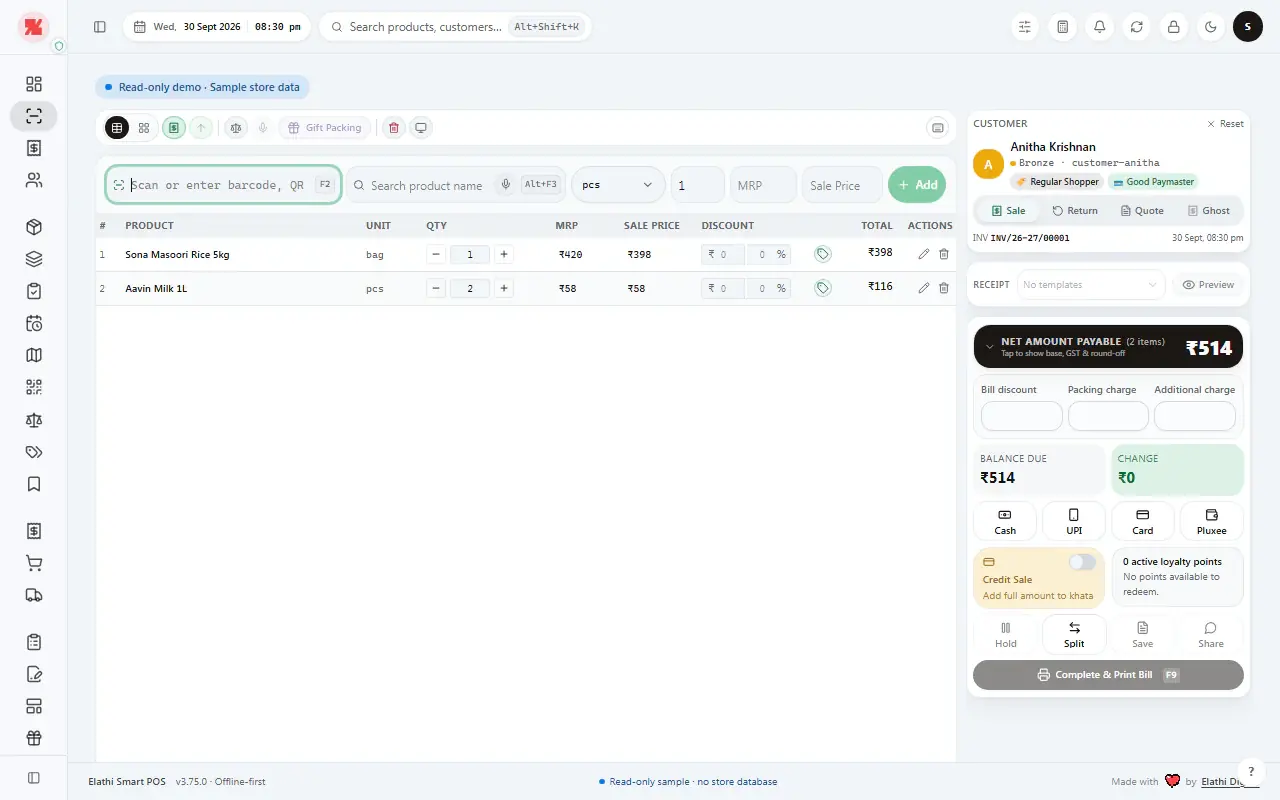
Ask for a walkthroughFind an item. Build the bill. Take payment.
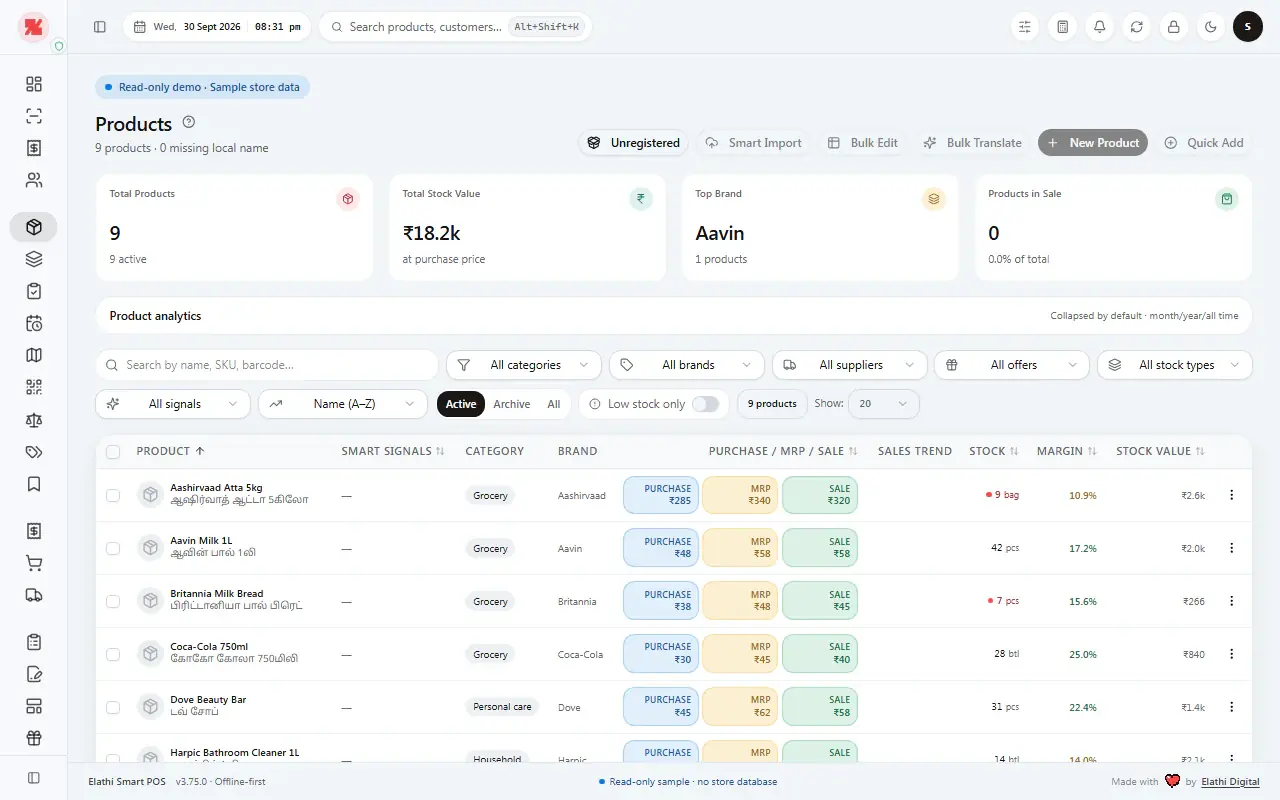
See what you have and what needs restocking.
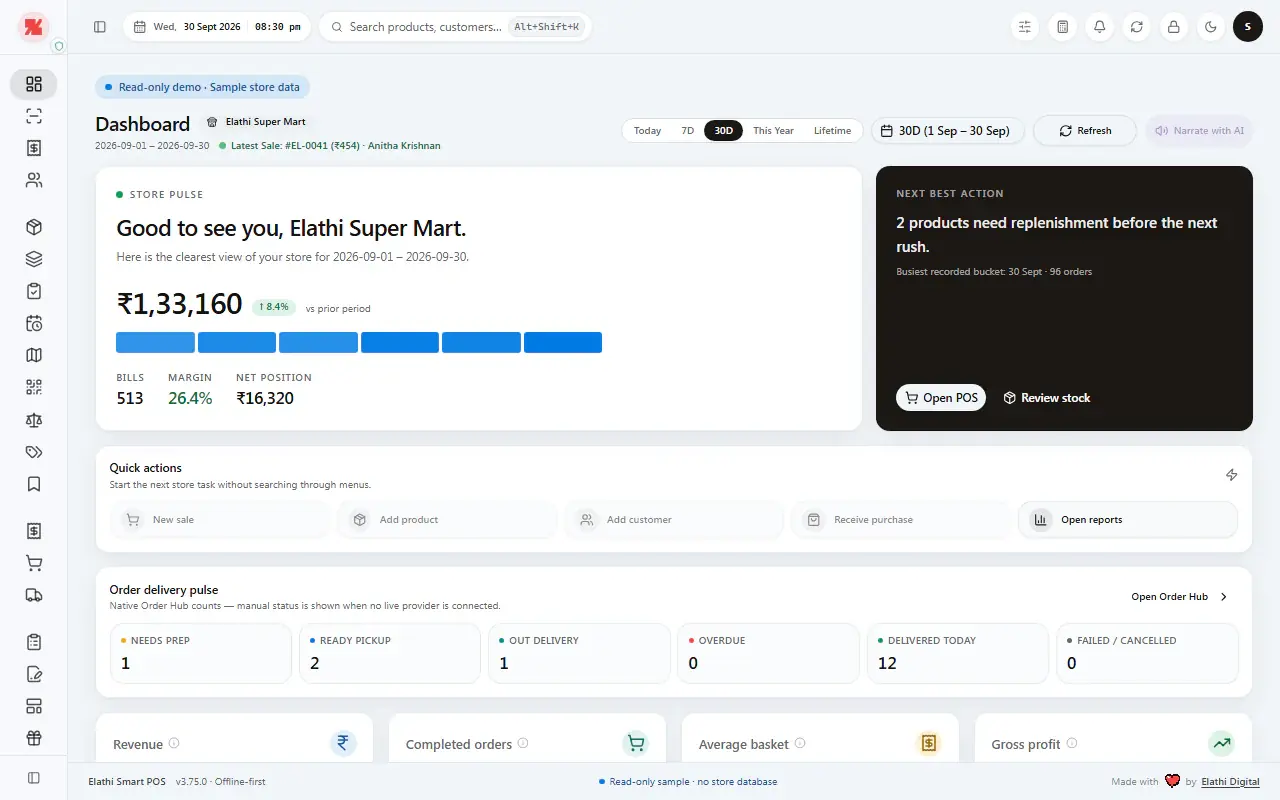
See how the day is going, at a glance.
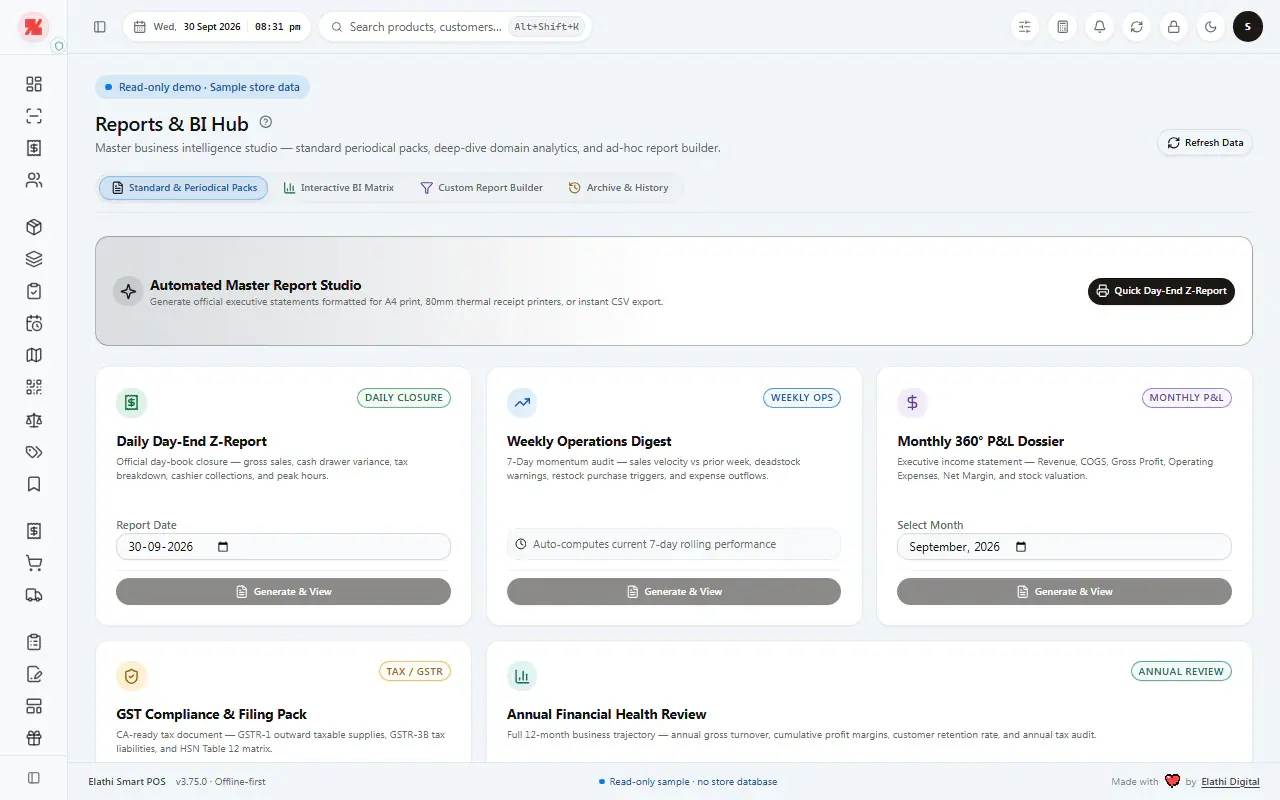
Sales and stock reports, by date range.
Customer balances and history in view.
The sample store shown is fictional and uses demonstration data.
Look closer at the real app.
Pick a screen, then tap a blue dot or a name on the right to see what it does. This is the actual SmartPOS interface with demonstration data.
Sales for the period with bills, margin and net position, as soon as you open the app.
A suggested next step — such as products that need replenishment — with shortcuts to open POS or review stock.
Start a sale, add a product or customer, receive a purchase or open reports in one click.
Follow orders by status: needs prep, ready for pickup, out for delivery, overdue and delivered today.
Scan a barcode or type a product name, set quantity and price, then press Add.
Each item shows unit, quantity, MRP, sale price, discount and line total.
Attach a customer to the bill and choose Sale, Return or Quote.
The total to collect, shown large, with bill discount, packing and additional charges.
Take payment in Cash, UPI, Card or Pluxee.
Add the full amount to the customer’s khata with one switch.
Finish the bill and print it from the same screen.
Total products, stock value at purchase price, top brand and products on sale.
Filter by category, brand, supplier, offers, stock type or low stock.
Purchase, MRP and sale price, stock level, margin and stock value for every product.
Standard packs, an interactive BI matrix, a custom report builder and an archive.
Generate a day-end statement for A4 print, 80mm receipt printers or CSV export.
Day-End Z-Report, Weekly Operations Digest, Monthly P&L Dossier, GST Compliance & Filing Pack and Annual Financial Health Review.
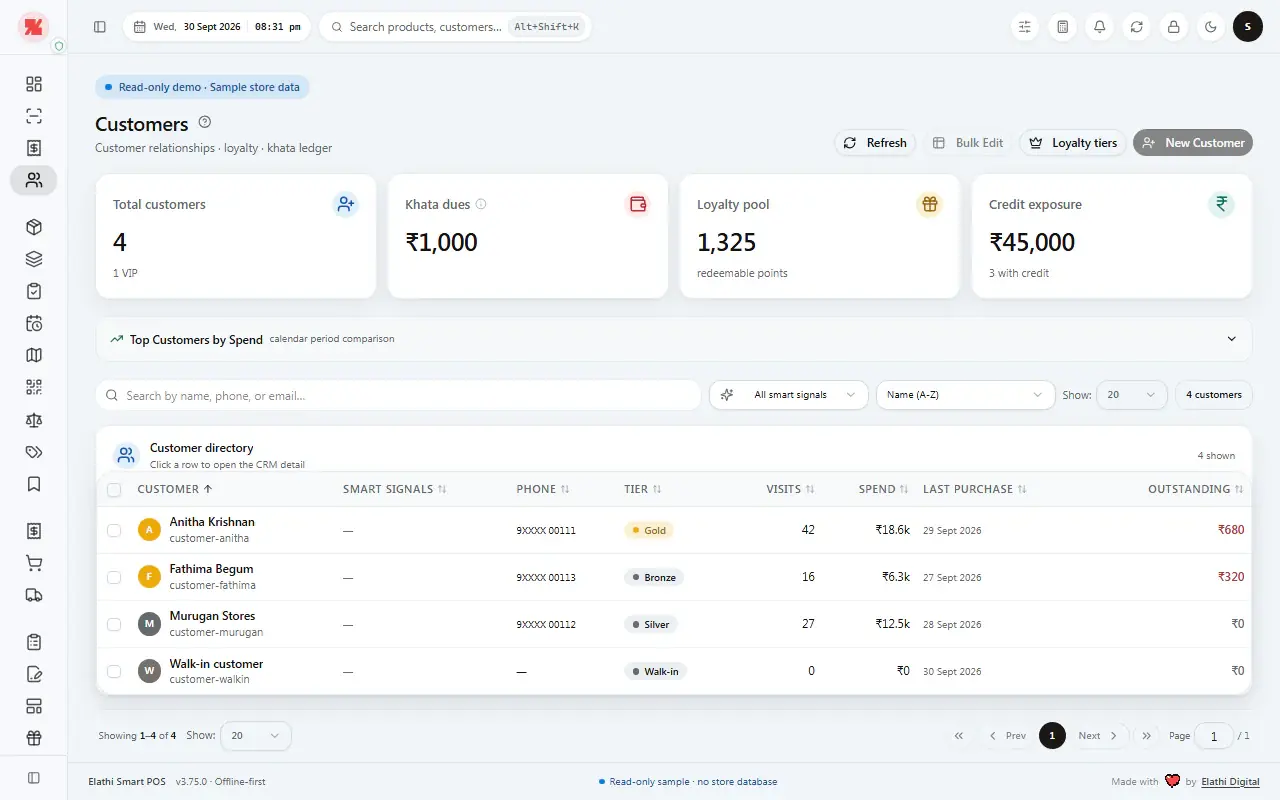
Total customers, khata dues, loyalty pool and credit exposure in four cards.
Each customer’s tier, visits, spend, last purchase and outstanding balance.
The everyday work, all in one app.
Keep bills, products, customer accounts, purchases and reports together. Find the details again when you need them.
Create bills. Find them later.
Add customer details and open a bill again to review or print.
Keep product details up to date.
Names, codes, prices and stock your team can find at the counter.
Customer balances in view.
See what a customer owes, their payments and past purchases.
Purchases and expenses.
Record incoming stock and store expenses beside your sales.
Reports for any dates.
Choose a date range and review sales or stock reports.
Set up your store and counter.
Store details, staff access and supported counter equipment.
Made for Indian retail.
Whether you run a kirana, grocery, department store or supermarket, manage daily sales and records in one place.
Daily essentials
Kirana & provision
Find regular items and keep customer balances handy.
Ask about kirana storesFresh & packaged
Grocery stores
Manage products, receive stock and make bills.
Ask about grocery storesMore to manage
Department stores
Keep products, staff and sales records organised.
Ask about department stores“We recently started using Elathi SmartPOS, and we’re very happy with the experience so far.”
S. Panchanathan Store · Customer feedback
Works with your counter.
Use your usual tools, share files and send messages only when you choose.
Supported scanners that enter product codes like a keyboard.
Printers set up in Windows, including compatible ESC/POS thermal printers.
Open a message in WhatsApp, check it, then choose whether to send.
Export store reports and catalogue files for your records.
Optional Canva Connect. Export catalogue files for Shopify or WooCommerce; later changes do not sync automatically.
Pay once. Keep it.
Try every feature for 7 days without entering payment details. Each plan includes one Store Host PC; extra LAN terminals need a separate license.
Find your plan
How many checkout counters?
How long will you use it?
Lifetime · ₹24,999 one-time
Lifetime updates and standard support for one Store Host PC. One Store Host PC is included.
Ask about this planStandard
Perpetual license for one Store Host PC.
- Keep your installed license after year one
- Year one of updates and standard support
- Renew Care for future updates and support
- Extra LAN terminals sold separately
Lifetime
One Store Host PC — best for the long run.
- Lifetime updates and standard support
- Billing, stock, purchases and reports together
- Extra LAN terminals sold separately
- 7-day full trial before purchase
Both prices are one-time. Ask us to confirm your PC and counter equipment are supported.
Before you get started.
Questions about your computer, counter setup or plan? We can help.
What computer do I need?
SmartPOS runs on supported Windows PCs, including PCs with tablet-size screens.
Ask us about thisCan I try SmartPOS first?
Yes. Try every feature for 7 days. You do not need to enter payment details to start.
Ask us about thisHow do I get started?
Start the 7-day free trial by messaging us on WhatsApp or sending the callback form. We’ll help you check your PC and counter equipment first.
Ask us about thisCan I use it without internet?
Everyday store work on the main Windows PC runs without internet. A connection is needed to activate SmartPOS, download updates, use Canva Connect and open WhatsApp.
Ask us about thisDo I pay for Standard every month?
No. It is a one-time purchase for one Store Host PC. Updates and support are included for year one; after that your license keeps working, and you can renew Care for future updates and support.
Ask us about thisCan I add another checkout computer?
Yes, extra checkout computers are licensed separately. Tell us how many counters you have and we’ll help plan the setup.
Ask us about thisDoes SmartPOS send WhatsApp messages for me?
No. It opens a message in WhatsApp for you to review. You choose whether to send it.
Ask us about thisCan I print reports and receipts?
Yes. Bills can be printed from the billing screen, and the Reports hub formats statements for A4 print or 80mm receipt printers, with CSV export. Printers need to be set up in Windows.
Ask us about thisDoes SmartPOS have GST reports?
The Reports hub includes a GST Compliance & Filing Pack, alongside the Day-End Z-Report, Weekly Operations Digest and Monthly P&L Dossier. Ask us what it covers for your filing needs.
Ask us about thisCan I add my existing products?
The Stock screen includes Smart Import and Bulk Edit tools for managing many products at once. Tell us what format your product list is in and we’ll confirm the best way to bring it in.
Ask us about thisCan I see product names in my own language?
The product list can show a local-language name next to the English one, as in the Stock screen. Ask us about the languages you need.
Ask us about thisDo Shopify and WooCommerce products update automatically?
No. You can export the current catalogue as a file; later changes in SmartPOS do not update that file.
Ask us about thisPrefer a call?
Request a callback.
Tell us about your store and we’ll get back to you by phone or WhatsApp.
See if SmartPOS fits your store.
Tell us what kind of store you run and what computer you use. We’ll reply on WhatsApp.